JSF stands for Java Server Faces and it is an industry standard and a server side user interface component framework for building component-based user interfaces for web applications. JSF has set of pre-assembled User Interface (UI).
It is event-driven programming model. By that it means that JSF has all necessary code for event handling and component organization. Application programmers can concentrate on application logic rather sending effort on these issues. It has component model that enables third-party components to be added like AJAX.
Saturday, September 25, 2010


Friday, September 17, 2010
My wonderful journey to "Shirdi"
My friends and I have a very great journey to Shirdi, which started on 30th July of 2010 and lasted for 2 days and I can say that, this tour is one of my great tours in my journey of life. So, I am very excited to share my experience with all of you......... :)
I appreciate all those persons who would spend some time to have a look at this.......
Our journey started on Friday at our office at 4 pm on the 30th July 2010, in an auto and we have reached the Secunderabad station nearly at 6.00 pm. It is cool. We had successfully got into the train on time with full anxiety in all the faces. We have a small breakfast before the journey started almost at 6.20 pm. Then our faces were glowing with happiness.
We started talking about our office after sometime we started playing dhum sharm arts which is most fun part of our journey, after playing almost for 2 hours we had our dinner, which we bought from the famous PARADISE restaurant in Secunderabad, after finishing dinner again we started playing dhum sharm arts almost up to 11, as it is a train journey the police were moving here and there and finally we had to stop playing as co-passengers started to sleep and finally we have reached Nagarsol by next day morning.
We all got our luggage and got down from the train and saw that almost full train got down at Nagarsol as it a Saturday. So we finally got out of station and saw all the buses were full and there is no bus available for us to go to shirdi. But there were many taxis and the hire fares are very high. So we couldn’t get into that taxis also. Almost all of the taxi drivers were from Hyderabad itself, finally another bus came so we all started to follow that bus, suddenly one of the taxi driver agreed to take us to Shirdi at lower fare which is almost at bus fare so we got into the taxi and this driver is also from Hyderabad.
Finally we got the taxi and asked him to take us to some lodge, but he said that he has lodge and rental fare is also reasonable, so we are ready to go to his place and decided to stay at his place as it was good and reasonable. After that we starting asking him want are all the places that we can see over there.
We have checked what all the places to cover are, after that we came to know that the harathy was going to be at 11:30 so we all started to get ready to go the temple. Finally we got ready to go to temple it was 9:30. After reaching temple we came to see that the temple is very crowded. We have stood in Darshan Q which took us almost one and half hour to reach SAI BABA. After Darshan we all were scattered up at the end and by the time I saw around, there were none of my friend beside me.
After that I was on my way to museum and other places, in the middle I met all others one by one. One after one came so finally we checked whether all came or not. Next everybody went to buy prasadam to relatives friends, after that we saw that its almost lunch time and everybody is hungry and so all of us decided to go to devastanam to have lunch. So we have started but everyone is tried to walk to devastanam as no one is wearing sandals suddenly we saw bus their which take people to devastanam for free. So we went to that bus but only few of them able to get into bus and other went there by walk. At last we all gathered at devastanam and were shocked to see the shirdi devastanam as it is really very big and the maintenance over there is too good similar to any five star Hotel, the food also tastes good and all that is for 10 rs only.
We all finished lunch and started to walked back to rooms which is about 2-3km and after walking for such long distance people still have energy to go to ShaniSinganapur. So finally we have talked to driver for a decent rental fare and got ready for journey.
The journey to Shanisingnapoor:

 ShaniSinganapur is one of the holiest places in Maharashtra. It is very famous for the lord Shani. The journey to ShaniSinganapur is nearly 2 hrs from Shirdi. While we are going to ShaniSinganapur, we have seen two to three places like Veerabadra Temple and other.
The above images are captured at Veerabadra Temple, Its looking like one of the good visiting place in Maharastra.

This image shows another Temple which we have visited while going to ShaniSinganapur.
I would like to discuss one interesting thing here. While we are going to ShaniSinganapur, there are number of Sugar cane juice shops beside the main road. We surprised by looking the preparation of Shugar cane juice with bulls and wooden gears. The juice was so tasty that we had drunk almost 20 glasses for the 9 people. We have enjoyed sometime there by spending on capturing photos and having the cane juice.
We thought that, if any person comes ShaniSinganapur tour, he should not miss to have the Sugar Cane Juice.
This image shows the preparation of Sugar cane Juice.
After Successful journey we have reached ShaniSinganapur at 6.30pm. Because that day was Saturday and it is a special day for Lord Shani, and the temple at ShaniSinganapur was packed with devotees. It is a custom there that only gents are allowed near the idol and that too only after taking a bath and with wet Dhotis provided there. There is a special queue for those who want to approach the idol, and this was quite long. We had darshan soon, and started on our return journey and we have reached Shirdi almost at 10.30 pm.
We had our dinner and we slept for the day.
Next day we planned to go for Nasik and Thrayambakeshwar and also Panchavati.
Due to our fixed plan we have got up at 7:00 AM and we completed the daily chores and we starts to go Nasik at 9.00 am. It was the long journey of 3 hours to reach Nasik. It was raining, cool and full crowd.
Nasik:

Nasik is one of the world's holiest Hindu cities. Known for its beautiful and picturesque surroundings, flourishing valleys, Nasik is home to many vineyards and orchards. Today, Nasik is rate as one of India's fastest growing cities. Nasik is known for its pleasant and cool climate, picturesque surroundings, high standard of living, greenery and well-developed infrastructure.
We had Darshan at 3.30 pm in Rama temple which we are seeing in image above. After completion of Darshan we started moving to Trimbakeshwar.
While going to Trimbakeshwar from Nasik, it was fully raining. All of our bags are sinking with rain water as we kept those on the top of our vehicle.
We had Darshan at 3.30 pm in Rama temple which we are seeing in image above. After completion of Darshan we started moving to Trimbakeshwar.
While going to Trimbakeshwar from Nasik, it was fully raining. All of our bags are sinking with rain water as we kept those on the top of our vehicle.

It was fully green on the both sides of the road. It looks superb while we are crossing the mountains. The water falls are running with heavy water and look good.
We have tried to capture most of the seines by camera while we are traveling. As we are moving so fast in the qualis, we were unable to capture more things. At last we have captured some of the natural things.

The images shown here are the captured by us while we are moving to Trayambakeshwar..
Finally, after successful journey we have reached Trayambakeshwar at 4.00pm. It was fully raining, so we bought the covers for 10 rupees for each and we went to the temple.
From the long view of the Trayambakeshwar was amazing with the surrounding water falls.
Trayambakeshwar:

Trimbakeshwar temple is a religious center having one of the twelve Jyotirlingas. The extraordinary feature of the Jyotirlinga located here is its three faces embodying Lord Brahma, Lord Vishnu and Lord Rudra. Due to excessive use of water, the linga has started to erode. It is said that this erosion symbolizes the eroding nature of human society. The Lingas at Trimbakeshwar are covered by a jeweled crown which is placed over the Gold Mask of Tridev (Brahma Vishnu Mahesh). The crown is said to be from the age of Pandavs and consists of diamonds, emeralds, and many precious stones. The crown is displayed every Monday from 4-5 pm (Shiva).All other Jyotirlingas have Shiva as the main deity. The entire black stone temple is known for its appealing architecture and sculpture and is at the foothills of a mountain called Brahmagiri.Three sources of the godavari originate from the brahmagiri mountain.
It has taken 1 1/2 hour to come from darshan in temple. After completion of Darshan, we started to coming Panchavati. We had lunch in Andra mess, its on the way to Trimbakeshwar to Panchavati. We have reached the panchavati at 6.30 pm.
It has taken 1 1/2 hour to come from darshan in temple. After completion of Darshan, we started to coming Panchavati. We had lunch in Andra mess, its on the way to Trimbakeshwar to Panchavati. We have reached the panchavati at 6.30 pm.
Panchavati:
In Panchavati, there are five trees marked, one of which is an Ashoka tree. There is also a cave here called Sita Guha. Sita, Ram and Lakshman prayed here to Lord Shiva. The ancient Shivalinga still exists in the small temple in the cave and is visited by devotees. Today this area is a major pilgrimage and tourist attraction.

Panchavati is one of the coolest and cleanest areas of Nasik. It has got many temples like Kalaram Madir, Goraram Mandir, Sita Gupha. There are many temples in Tapovan which is very close to Panchavati and can be considered to be in Panchavati.
People of Panchavati are soft-spoken. They are proud of the culture and of five thousand year old tradition.
The image shows the Triveni Sangamam located in the Panchavati. The two rivers Aruna and Varuna comes from underground and combines with the river Godavari. At this place Kumbamela is celebrated for every 12 years. Most of the devotes come to this place on the days of Kumbamela. According to Hindu mythology, it is believed to be the place where a few drops of 'amrut' fell while the kalash was carried to the devatas.

From Panchavti we directly came to Railway station at 8.30 pm and we have caught the train on time. We played Dhum Sharam arts again in the train and we also recollected the memorable movement which we have in the tour. We enjoyed a lot. We have reached the Secunderabad railway station at 8.30 am and as usually we came to office on Monday
In Conclusion, I would like to say that, we have a great journey experience and we had lot of enjoyment in this tour. I wish to have such a great experience to all, who goes to Shirdi.
Thanks to all .....................
Friday, August 27, 2010
Phone Calls through GMail at lower rates
Are you using the Gmail voice and vedio chat to communicate your dear ones. Yes? its good... Now you can communicate your dear ones when they are not before the computer. How? Its simply with "Google Net Talk".
Wouldn’t it be nice if you could call people directly on their phones using Gmail?
Lets start thinking about Google Net talk...
Google’s Gmail, the one of the largest e-mail site with millions of users worldwide. Recently, Google introduced the calling of landlines and mobiles phones using Gmail. So, from now you can call to your dear ones using the Gmail and u can enjoy the talking with them at lower rates.
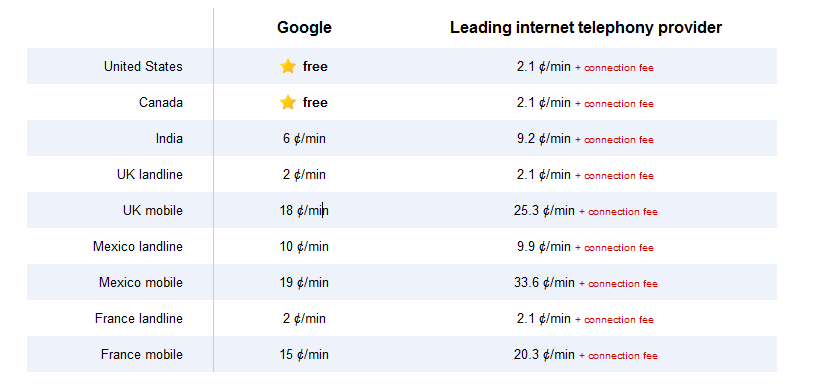
In their blog they are telling about rates as "Calls to the U.S. and Canada will be free for at least the rest of the year and calls to other countries will be billed at our very low rates. We worked hard to make these rates really cheap (see comparison table) with calls to the U.K., France, Germany, China, Japan—and many more countries—for as little as $0.02 per minute".
Comparison of rates are looks like this.
You can find the more details about call rates in the fallowing link https://www.google.com/voice/rates
How to use it?
Google said making a call through its service works like a normal phone in that a user could click on the "call phone" option in their chat buddy list in Gmail and type in the number or enter a contact's name.
If you have a Google Voice phone number, calls made from Gmail will display this number as the outbound caller ID. And if you decide to, you can receive calls made to this number right inside Gmail.

Can I use this now?
If you are from U.S. you can, but you shold have the installtion of voice and vedio plugin if you haven't already.
The Google people are saying that " We’re rolling out this feature to U.S. based Gmail users over the next few days, so you’ll be ready to get started once "Call Phones" shows up in your chat list. If you’re not a U.S. based user—or if you’re using Google Apps for your school or business—then you won't see it quite yet. We’re working on making this available".
What can we expect?
You can make the calls from Gmail using your computer only, you cannot call to a user by using Gmail in your mobile phone. Mobile version of Call Phones is not yet launched.
The service given by the Gmail might increase the popularity of Gmail, which might be the insipiration for the other emails stakes like yahoo and MSN to implement such a high level functionalities in the mails.
Conclusion:
In these days calling is so cheap from the prepaid and postpaid mobile services and other cell phone services. This might cause the less usage of Google Call Phone for domestic calls, but definately it might have great demand for the International Calls.
So, We have to wait until the google provides this Call Phone throught the world and see the
Calling is so cheap already that I don't think it will attract a huge amount of domestic calling. It could take some of the international market.
Inputs from:
Thursday, August 19, 2010
Enabling JMX remote port in WEBLOGIC
Weblogic runs with domains. With different domains you can enable the JMX port by fallowing the below steps.
Step 1: Go to your domain bin folder, which you want to enable JMX remote port.
Ex: C:\bea\wlserver_10.3\samples\domains\wl_server\bin
Step 2: edit the “setDomainEnv.cmd” file and add the fallowing code as above line of the set CLASSPATH
Step 4 : Try to connect for the Jconsole with host:8006, It will connect to your domain of weblogic server.
Step 1: Go to your domain bin folder, which you want to enable JMX remote port.
Ex: C:\bea\wlserver_10.3\samples\domains\wl_server\bin
Step 2: edit the “setDomainEnv.cmd” file and add the fallowing code as above line of the set CLASSPATH
set JAVA_OPTIONS= %JAVA_OPTIONS%Step 3: Restart the weblogic server.
-Dcom.sun.management.jmxremote
-Dcom.sun.management.jmxremote.port=8006
-Dcom.sun.management.jmxremote.ssl=false
-Dcom.sun.management.jmxremote.authenticate=false
Step 4 : Try to connect for the Jconsole with host:8006, It will connect to your domain of weblogic server.
Fetch All the Records From Cassandra database exmaple
package com.examples;
import java.io.UnsupportedEncodingException;
import java.util.Date;
import java.util.Iterator;
import java.util.List;
import org.apache.cassandra.thrift.Cassandra;
import org.apache.cassandra.thrift.Column;
import org.apache.cassandra.thrift.ColumnOrSuperColumn;
import org.apache.cassandra.thrift.ColumnParent;
import org.apache.cassandra.thrift.ConsistencyLevel;
import org.apache.cassandra.thrift.InvalidRequestException;
import org.apache.cassandra.thrift.KeyRange;
import org.apache.cassandra.thrift.KeySlice;
import org.apache.cassandra.thrift.NotFoundException;
import org.apache.cassandra.thrift.SlicePredicate;
import org.apache.cassandra.thrift.SliceRange;
import org.apache.cassandra.thrift.TimedOutException;
import org.apache.cassandra.thrift.UnavailableException;
import org.apache.thrift.TException;
import org.apache.thrift.protocol.TBinaryProtocol;
import org.apache.thrift.protocol.TProtocol;
import org.apache.thrift.transport.TSocket;
import org.apache.thrift.transport.TTransport;
public class CassandraFeatchHInfo {
public static final String UTF8 = "UTF8";
public static void main(String[] args) throws UnsupportedEncodingException,
InvalidRequestException, UnavailableException, TimedOutException,
TException, NotFoundException {
TTransport tr = new TSocket("192.168.1.204", 9160);
TProtocol proto = new TBinaryProtocol(tr);
Cassandra.Client client = new Cassandra.Client(proto);
tr.open();
String keyspace = "Historical_Info";
String columnFamily = "Historical_Info_Column";
//String keyUserID = "3";
// read entire row
SlicePredicate predicate = new SlicePredicate();
SliceRange sliceRange = new SliceRange();
sliceRange.setStart(new byte[0]);
sliceRange.setFinish(new byte[0]);
predicate.setSlice_range(sliceRange);
KeyRange keyrRange = new KeyRange();
keyrRange.setStart_key("1");
keyrRange.setEnd_key("");
//keyrRange.setCount(100);
ColumnParent parent = new ColumnParent(columnFamily);
Listls = client.get_range_slices(keyspace, parent, predicate, keyrRange, ConsistencyLevel.ONE);
for (KeySlice result : ls) {
Listcolumn = result.columns;
for (ColumnOrSuperColumn result2 : column) {
Column column2 = result2.column;
System.out.println(new String(column2.name, UTF8) + " -> " + new String(column2.value, UTF8));
}
}
tr.close();
}
}
Cassandra Fetch Example -- Single Row fetch
package com.examples;
import java.io.UnsupportedEncodingException;
import java.util.Date;
import org.apache.cassandra.thrift.Cassandra;
import org.apache.cassandra.thrift.Column;
import org.apache.cassandra.thrift.ColumnPath;
import org.apache.cassandra.thrift.ConsistencyLevel;
import org.apache.cassandra.thrift.InvalidRequestException;
import org.apache.cassandra.thrift.NotFoundException;
import org.apache.cassandra.thrift.TimedOutException;
import org.apache.cassandra.thrift.UnavailableException;
import org.apache.thrift.TException;
import org.apache.thrift.protocol.TBinaryProtocol;
import org.apache.thrift.protocol.TProtocol;
import org.apache.thrift.transport.TSocket;
import org.apache.thrift.transport.TTransport;
import org.apache.thrift.transport.TTransportException;
public class CassandraFetchHInfo {
public static final String UTF8 = "UTF8";
private static Long hiId = new Long(1) ;
public static void main(String[] args) throws UnsupportedEncodingException,
InvalidRequestException, UnavailableException, TimedOutException,
TException, NotFoundException {
CassandraFetchHInfo cassandraFetchHInfo = new CassandraFetchHInfo();
cassandraFetchHInfo.insertHistoricalInfo(hiId, objectObjHierarchyId, hiParameterOid, hiMonitoredValue, hiTimestampCreated, hiObjectId, hiInfoEventType);
}
public void insertHistoricalInfo(Long hiId,
Long objectObjHierarchyId, String hiParameterOid,
String hiMonitoredValue, Date hiTimestampCreated,
Object hiObjectId, String hiInfoEventType) {
System.out.println("Stating of class................................");
try {
TTransport tr = new TSocket("localhost", 9160);
TProtocol proto = new TBinaryProtocol(tr);
Cassandra.Client client = new Cassandra.Client(proto);
tr.open();
String keyspace = "Historical_Info";
String columnFamily = "Historical_Info_Column";
String keyUserID = hiId.toString();
ColumnPath colPathhiId = new ColumnPath(columnFamily);
colPathhiId.setColumn("hiId".getBytes(UTF8));
// read single column
System.out.println("single column:");
Column col = client.get(keyspace, keyUserID, colPathhiId, ConsistencyLevel.ONE).getColumn();
System.out.println("column name: " + new String(col.name, UTF8));
System.out.println("column value: " + new String(col.value, UTF8));
System.out.println("column timestamp: " + new Date(col.timestamp));
tr.close();
} catch (UnsupportedEncodingException e) {
e.printStackTrace();
} catch (InvalidRequestException e) {
e.printStackTrace();
} catch (TTransportException e) {
e.printStackTrace();
} catch (UnavailableException e) {
e.printStackTrace();
} catch (TimedOutException e) {
e.printStackTrace();
} catch (TException e) {
e.printStackTrace();
} catch (NotFoundException e) {
e.printStackTrace();
}
}
}
Cassandra insertion example
package com.example;
import java.io.UnsupportedEncodingException;
import java.util.Date;
import org.apache.cassandra.thrift.Cassandra;
import org.apache.cassandra.thrift.Column;
import org.apache.cassandra.thrift.ColumnPath;
import org.apache.cassandra.thrift.ConsistencyLevel;
import org.apache.cassandra.thrift.InvalidRequestException;
import org.apache.cassandra.thrift.NotFoundException;
import org.apache.cassandra.thrift.TimedOutException;
import org.apache.cassandra.thrift.UnavailableException;
import org.apache.thrift.TException;
import org.apache.thrift.protocol.TBinaryProtocol;
import org.apache.thrift.protocol.TProtocol;
import org.apache.thrift.transport.TSocket;
import org.apache.thrift.transport.TTransport;
import org.apache.thrift.transport.TTransportException;
public class CassandraInsertExample {
public static final String UTF8 = "UTF8";
private static Long hiId = new Long(1) ;
public static void main(String[] args) throws UnsupportedEncodingException,
InvalidRequestException, UnavailableException, TimedOutException,
TException, NotFoundException {
CassandraInsertExample cassandraInsertHInfo = new CassandraInsertExample();
cassandraInsertHInfo.insertHistoricalInfo(hiId);
}
public void insertHistoricalInfo(Long hiId) {
System.out.println("Stating of class................................");
try {
TTransport tr = new TSocket("localhost", 9160);
TProtocol proto = new TBinaryProtocol(tr);
Cassandra.Client client = new Cassandra.Client(proto);
tr.open();
String keyspace = "Employee";
String columnFamily = "Employee_Details";
String keyUserID = hiId.toString();
// insert data
long timestamp = System.currentTimeMillis();
ColumnPath colPathhiId = new ColumnPath(columnFamily);
colPathhiId.setColumn("hiId".getBytes(UTF8));
client.insert(keyspace, keyUserID, colPathhiId, hiId.toString().getBytes(UTF8), timestamp, ConsistencyLevel.ONE);
//Fetching of single row
Column col = client.get(keyspace, keyUserID, colPathhiId, ConsistencyLevel.ONE).getColumn();
System.out.println("column name: " + new String(col.name, UTF8));
System.out.println("column value: " + new String(col.value, UTF8));
System.out.println("column timestamp: " + new Date(col.timestamp));
tr.close();
} catch (UnsupportedEncodingException e) {
e.printStackTrace();
} catch (InvalidRequestException e) {
e.printStackTrace();
} catch (TTransportException e) {
e.printStackTrace();
} catch (UnavailableException e) {
e.printStackTrace();
} catch (TimedOutException e) {
e.printStackTrace();
} catch (TException e) {
e.printStackTrace();
} catch (NotFoundException e) {
e.printStackTrace();
}
}
}
Tuesday, August 17, 2010
Introduction to Apache Cassandra
What is Cassandra?
Apache Cassandra is a non relational database which is given by the Apache. Initially, Cassandra was open sourced by Facebook in 2008, and is now developed by Apache Group.
Apache Cassandra is a non relational database which is given by the Apache. Initially, Cassandra was open sourced by Facebook in 2008, and is now developed by Apache Group.
In the normal relational databases data will store as rows, but in Cassandra the data will stored in columns format as key value pairs. Due to this column based data storage its giving the high performance while comparing the relational databases.
But there is No SQL, then how to Query?
But there is No SQL, then how to Query?
To insert and retrieve the data there are some apis. Thrift framework is also one of its client API. Essentially a communication protocol used not just by Cassandra but by many others.
Who are using Apache Cassandra?
Who are using Apache Cassandra?
Cassandra is in use at Digg, Facebook, Twitter, Reddit, Rackspace, Cloudkick, Cisco, SimpleGeo, Ooyala, OpenX, and more companies that have large, active data sets. The largest production cluster has over 100 TB of data in over 150 machines.
For the RDBMS users it will take time to implement the Cassandra.
Terminology of Cassandra:
- Column – Column is a tuple with binary no-fixed length name and value along with the timestamp. To keep it simple ignore the timestamp for the moment.
- Super Column - Essentially a container for one or more columns. It is again a tuple with a binary name and a map of where key is the same as the name of the column
- Column Family - A structure which keeps an infinite number of rows just like a traditional table. Each row in itself has a binary key and a map of where again a key is the same as the name of the column
- Super Column Family - Same as column family with the exception that each row has a map of super columns instead of columns. The map is keyed with the name of each SuperColumn and the value is the SuperColumn itself
- Keyspace - It is like schema containing the column families
Sorting - The data is sorted as soon as we put the data within the cluster and it remains that way as there is no way to do it while fetching the data which makes it all the most necessary to plan it right as per the access path. I am not going to go all in detail here but I guess you got the idea.
What might be the reason to develop Cassandra in Java?
-
Security: it's easier to write secure software in Java than in C++ (remember the buffer overflows?) - Performance: it's not THAT worse. It's definetely worse at startup, but once the code is up and running, it's not a big thing. Actually, you have to remember an important point here: Java code is continually optimized by the VM, so in some circunstances it get faster then C++
Features of Cassandra:
- Fault Tolerant : Data is automatically replicated to multiple nodes. Loosing a node doesn’t bring down the cluster
- Flexible Schema : We are talking in terms of columns, supercolumns and columnfamilies instead of rows and tables. BigTable datamodel
- Symmetric : No single point of failure, Every node within the cluster is identical and there are no network bottlenecks
- Scalable : Linear with addition of new machines with no downtime or interruption to applications. Read and write throughput increase linearly as new machines are added
- Support for Large Data : The ability to scale to many hundreds of gigabytes of data
- Written in Java : Originally built for facebook and then made open source
Wednesday, August 11, 2010
Apache Cassandra
Some of useful links
http://cassandra.apache.org/
http://schabby.de/cassandra-installation-configuration/
http://arin.me/blog/wtf-is-a-supercolumn-cassandra-data-model/comment-page-2#comment-728
http://www.divconq.com/2010/how-to-add-and-retrieve-data-from-a-cassandra-database/
http://nosql.mypopescu.com/post/277382598/cassandra-gets-better-documentation
http://www.rackspacecloud.com/blog/2010/05/12/cassandra-by-example/
http://blog.evanweaver.com/articles/2009/07/06/up-and-running-with-cassandra/
http://maxgrinev.com/2010/07/12/do-you-really-need-sql-to-do-it-all-in-cassandra/
Monday, August 2, 2010
Java Performance Tuning Tips
- Counting down (i.e. for (int i=n; i>0; i--)) is twice as fast as counting up: my machine can count down to 144 million in a second, but up to only 72 million.
- Calling Math.max(a,b) is 7 times slower than (a > b) ? a : b. This is the cost of a method call.
- Arrays are 15 to 30 times faster than Vectors. Hashtables are 2/3 as fast as Vectors.
- Use System.arraycopy(firstArray, 0, secondArray, 0, firstArray.length) method instead of iterating the first array and copying into second array.
- Use compound assignment operators (+=, -=, *=, and /=) instead of using normal operators.
- Ex: a = a+b takes longer time to execute when compared to a += b. In fact, these cause different Java byte codes to be generated.
- Eliminate unnecessary code in the loops and you should avoid declaring variables unnecessarily within loops.
- Use int instead of other primitive types because operations performed on int primitives generally execute faster than for any other primitive type supported by Java, so you should use int values whenever possible; char and short values are promoted to int automatically before arithmetic operations.
- Use notify() instead of notifyAll(), notify will execute faster than notifyAll().
- When joining couple of Stings use StringBuffer instead of String.
- Don't try to convert Strings to upper or lower case for String comparison.
- In the String Class prefer charAt() method instead of startsWith() method. From performance perspective, startWith() makes quite a few comparisons preparing itself to compare it's prefix with another string.
- Don' t initialize the public instance variable in constructor if they already initialized outside the constructor. Because all public initialized instance variables are again initialized in constructor by default.
- Vector provides the following methods to insert elements. addElementAt( e, index)
addElement (e)
add(e)
add(index, e) - Out of these try to avoid using methods, addElementAt( e, index) and add(index, e). The way these methods work is , all the elements are moved down between the insertion point and the end of the vector, making space for the new Element. The same works for deleting element at a Particular index. If possible, if these features are required, then try to use a different Data Structure if possible.
- If the approximate size of the Vector is know initially then use it. Instead of declaring Vector as,
Vector v = newVector();
declare it as,
Vector v = new Vector(40);
or Vector v = new Vector(40,25) ; - This method indicates initial capacity of Vector is 40 and increment by 25 elements per expansion.The way the Vector is expanded is, a new Vector of double the size of currentVector is created, all the Elements in the old Vector is copied to the new Vector and then the old Vector is discarded. (During GC). This has major effect on performance.
Subscribe to:
Posts (Atom)